Somebody once said..

"If you convince people that the wheel isn't right, they will allow you to re-invent it"
Showing posts with label Web Attacks. Show all posts

Wednesday, July 13, 2011

Quick look into CVE-2011-1255 Microsoft IE Time Element Memory Corruption vulnerability

Microsoft patched this vulnerability in June’s Patch Tuesday, but as usual an exploit has emerged for it. The M86 Security team stumbled upon an exploit in the wild and they have already done an excellent job of covering the exploit vector. I fired up Malzilla and decided to dig a little bit deeper to see how the exploit works.

This is a use-after-free vulnerability that is exploited using standard Heap spraying techniques and injected into the browser using a iFrame. Initially, it might seem confusing due to the obfuscation but its pretty straight forward to understand once we break it down into 4 parts -

  1. The Trigger
  2. The vulnerability
  3. Shell code
  4. Heap Spray & Main exploit

Trigger :

There are 4 functions that act as a trigger to the exploit – SetCookie(), GetCookie(), GetCookieVal() and DisplayInfo()

image

The exploit is designed to run only a couple of times in a day and this check is done with the help of client side cookies. So, the above functions are used to check the cookie. Since, the exploit was related to the Time element, initially I thought that the DisplayInfo() function was related to that, but that is not case. After the check is done, the JavaScript then calls eecc(), which is main function that exploits the vulnerability.

The Vulnerability :

According to the Microsoft Advisory MS11-050, the vulnerability is present in the way Internet Explorer attempts to access an HTML Time element object that has not been initialized or has been deleted.

But first, what is this Time element functionality ? – MSDN says:

HTML+TIME (Timed Interactive Multimedia Extensions), first released in Microsoft Internet Explorer 5, adds timing and media synchronization support to HTML pages. Using a few Extensible Markup Language (XML)-based elements and attributes, you can add images, video, and sounds to an HTML page, and synchronize them with HTML text elements over a specified amount of time.

Removing the shellcode and clearing up the script, with a few trial and errors I was able to create the PoC that will trigger the vulnerability -

image

The bug seems to be present in handling of freed up Time element objects. Line numbers #1 and #2 define the HTML time2 behaviour whereas #4 is the declaration of the “div” attribute that is used for associating the time2 functions.

Using JavaScript, #8 tries to free up this object and then #9 reloads the whole page. I think, this is where the memory corruption occurs and IE is not able to handle the objects properly giving us chance to reuse the allocated memory for the freed up object – hence the “use-after-free” title.

Note that all the above lines are required to reproduce the vulnerability including the Transition Filter definitions. According to the MS advisory IE 6,7 and 8 are vulnerable to this.

Shellcode :

Now that we know what the vulnerability is, achieving remote code execution is done by using standard Heap spraying techniques. But before we jump to that, there is an interesting obfuscation techniques deployed by the author of this exploit for aligning the shell code.

image

Just immediately after <div> tag, its easy to notice the blob of shellcode. However, if you look closely there are demarcations used for defining the boundaries in capital letters like “MM” or “NN”. So, while it may appear to be a single chunk of  shellcode, there are actually multiple parts of it.

image

Functions de(), codebk() and getdata() do the job of retrieving the shellcode in proper format. Normally, Shellcode is part of JS functions and obfuscation is done using bunch of math functions and eval calls but this technique of retrieving shellcode is pretty unique and I haven’t seen it before.

Removing the DOM references and modifying function getdata() as shown below, we can easily retrieve the proper shellcode using Malzilla’s JS engine or simply by running in the browser itself.

function getdata(a,b){

    var blob = “MMu9090u9090u10EBu4B5BuC933uB966u03F9u3480uE20BuFAE2u05E…”

//Truncated for sake of brevity. Put the entire shellcode text starting from MM to UU without spaces

    var aa=blob.indexOf(a);
    var bb=blob.indexOf(b);
    var temp="";
    temp=blob.substring(aa+2,bb);
    return temp;   
}
var sc = getdata("MM", "NN");
var ls = getdata("LL", "UU");
var block = codebk(getdata("TT", "KK"));
var pad = codebk(getdata("JJ", "LL"));
var base = codebk(getdata("XX", "YY"));
var s = getdata("OO", "PP");

document.write("SC="+sc);
document.write("\nLS="+ls);
document.write("\nBlock="+block);
document.write("\nPad="+pad);
document.write("\nBase="+base);
document.write("\nS="+s);

Using the modified getdata() and rest of the functions, we can easily print out the various parts of the shell code. The function codebk() and de() are just used to covert it into proper unicode format and unescape the Shell code.

Now, this post is turning out much longer than I thought, so I will cover the shell code probably in some other part, but from my basic dynamic analysis it looks like it drops a binary to a disk and executes it, which in-turn downloads further malware from the exploit hosting site itself.

Heap Spray and main exploit function :

Coming to the main function – eecc() - this is where all the magic happens. Once you substitute the various variables shown above and compare this with any standard Heap spraying code, you will immediately notice the similarities.

image

I wont spend to much time on Heap-spraying technique (Google it !) but most of it is pretty straight forward.

image

Initially, the function checks the value of the “User-Agent” string to detect the Browser version from which the page was accessed. Looks like the exploit was designed for IE 8.0, so If the browser is IE 8.0, the script proceeds with the exploit and gets all the Shellcode in the variables.

image

This is part which sprays the shellcode all over the heap. Next, the time element object is freed and page is reloaded triggering the memory corruption as we have already seen.

That’s it ! Some clever obfuscation tricks and a heap spray will get you malware installed on your system in no time. At this point, I don’t see anyone having a compelling reason to use Internet Explorer, but IE Fan boys should upgrade to the latest version of IE to remain safe, at least for the time being ;)

Friday, March 12, 2010

CVE-2010-0188 Adobe Reader TIFF vulnerability

The recent Adobe reader vulnerability (CVE-2010-0188) seems to be doing lot of rounds these days. Thanks to Mila (contagio blog), I got a chance to look at the malicious PDF file.

A Quick look at the stats using pdf-parser tool reveals the structure of this file -

C:\Analyze>pdf-parser.py -a "2010 March Luncheon Invitation_FINAL.pdf"
Comment: 4
XREF: 0
Trailer: 0
StartXref: 2
Indirect object: 43
12: 44, 45, 46, 55, 91, 92, 112, 114, 115, 117, 115, 135
/Catalog 1: 43
/EmbeddedFile 9: 2, 3, 5, 6, 7, 121, 122, 123, 124
/Filespec 2: 116, 134
/Metadata 2: 13, 13
/ObjStm 9: 125, 126, 127, 128, 129, 130, 131, 132, 136
/XObject 6: 56, 57, 113, 118, 119, 120
/XRef 2: 133, 137

Since most of the PDF exploits are created using embedded JavaScript, my instinct was to look for JavaScript object streams inside the PDF. But that didn’t reveal any interesting results, so I turned my attention to other objects.

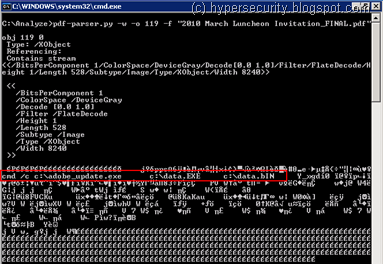
The actual shellcode appears to be present in object 119 -

image

..while the TIFF file in object 122 is used to cause the overflow in the ImageConversion.api -

image

Finally object 3 contains the reference to TIFF file -

image

All the streams in the PDF file are compressed, so I had to use the “-f” option with pdf-parser tool to inflate them and see the content. There was also a wave file stream in the PDF which is a little strange, but I could not get it to play !

Both the dropped files appear to be the same as explained in Mila’s previous analysis on the Contagio blog. Lastly, the PDF seems to have been created on 25-Feb-2010 and modified on 03-Mar-2010 using Adobe LiveCycle Designer ES 8.2.

After reading some more on the exploit, I found that the exploit for this vulnerability does not use JavaScript. Which means even if you have disabled JavaScript in Adobe reader, this exploit will work and that probably explains why bad guys are going after this vulnerability despite Adobe releasing the patches last month !

Tuesday, February 16, 2010

Olympics 2010 news ending up with Malware

Recently I covered how malware authors use Blackhat SEO poisoning to distribute malware on unsuspecting victims. Since then, I have been closely monitoring the news trends and this time the bad guys are targeting is searches related to Vancouver Olympic games 2010.

Tragedy struck at the Olympic games Luge (ice racing) event, when a 21 year old athlete Nodar Kumaritashvili died during a practice session on Friday. Apparently a video of live footage spread across YouTube and other news channels like wild fire.

The IOC moved quickly to take the Luge crash videos off the Internet thus increasing the popularity of this search even further as those not glued to early coverage were desperate to get news on the Luge crash. The bad guys were quick enough to capitalize on this and started poisoning the search results with a lot of “bad” links.

Normally I find just a couple of links poisoned on the first page but this is the first time I saw more than 6 to 7 bad links on the first page of the Google search result itself !

LugeCrash_Search

Once you click on the poisoned link, you are presented with a YouTube like video loading screen which then displays a “ActiveX object missing” error.

LugeCrash_ActiveX

If you click on any of the buttons above a downloader Trojan gets installed on your PC which further downloads more malware. Unlike last time where it appeared that the machine was being scanned by AV, here its “missing video object” that is used to convince a unsuspecting victim to download the malware.

I am not sure why Google is not removing the bad links from their searches as they did last time when valentine day searches were getting poisoned results. This just shows that the bad guys are getting better with every new tragedy that is happening out there.

I would advise caution for all the readers who are trying to search for latest news videos out there. Do not click or install anything that claims to be a missing video codec or object.

99.9% of websites require only Adobe Flash player to be installed in order to play streaming videos. If you find a website that is not playing a video, just find another link that works with Flash ! And incase Flash is not installed, go and install it from adobe’s website rather than from the site which is hosting the video.

Wednesday, December 30, 2009

Digging deep into BlackHat SEO - Part2

This summary is not available. Please click here to view the post.

Thursday, December 24, 2009

Digging deep into BlackHat SEO – Part1

It was used before for tragic news and has been seen once again now when actress Brittany Murphy passed away over the last weekend. Cybercriminals have been very effectively using SEO techniques to download malware on users machines who are trying to browse Internet looking for latest breaking news.

A simple Google search for “Brittany Murphy death” reveals some interesting search results. After the first two-three valid results, there are some mysterious links that at first seem very valid based on the preview text you see in the results.

Fig1: Google search results for Brittany Murphy

There is no way any average user can figure this out but when you actually click on one of such links, it takes you to some completely different URL and often through multiple redirects.

This is all done using Search Engine Optimization (SEO) techniques. The bad guys first create a page and dump all the popular sentences surrounding a breaking news like – “Airline crash” or “Michael Jackson death” onto that page. They also inject an iframe on the same page that will have one or more redirects to a malicious web page. Then using special SEO tools like XRumer they increase their page ranking by spamming their URL all over the internet.

When you click on one such poisoned search result, suddenly out of no where there will be a windows pop-up alert on your screen -

Fig2: Security Warning pop-upFig2: Security Warning pop-up

Ultimately you end up landing on a page that first seems like an Antivirus which is scanning your local machine but is in fact a very cleverly designed web page.

Fig3: Windows Vista Look'n'feel AV

So depending on which OS you are running, the malicious webserver shows you a corresponding look and feel type of Antivirus program. This one above shows a Vista/Win7 look and feel to it where as if you are running WinXP you get this -

Fig4: Windows XP Look'n'feel AV

If you look closely, it is completely designed to trick a user into believing that a Antivirus is scanning the PC. If you are an average Internet user, you won’t even realize that this is being rendered through Internet Explorer ! That is some clever use of HTML and JavaScript code ;)

At this point, irrespective of where you click, you will be prompted to download and install a setup file which is nothing but a downloader Trojan. It downloads Rogue Antivirus program which not only have a look and feel of popular AV programs but also have funky names like “Antivirus 2010” or “PC Protect 2010”. But before you can say clean, it will prompt you for registration which can be anywhere from 30$ to 80$ :P !

This trick of threatening the a victim by showing how infected his PC is, works out rather well. A lot of not-so-tech-savvy people fall for such kind of tricks and the bad guys seem to be earning a lot. The Rogue AV products keep changing their names and so do the various domains that host these malicious pages. This has been one of the very popular attack vector for malware distributers in 2009.

In the next part I will show you what all things go behind the scene in these type of attacks.

Stay tuned and Merry Christmas ! :)

Wednesday, July 15, 2009

It's raining 0day's...

Whew.. ! Last 10 days have been quite busy for security folks like me. There have been 3 incidences of 0day's being discovered recently. It all started with the DirectX ActiveX vulnerability which I blogged previously. Then later, an Microsoft office web component ActiveX vulnerability was observed to be exploited in the wild. The list of domains hosting the Microsoft exploit is published & maintained at sans, so in case you are not too sure of a URL or domain, you can look it up there.

And today it's the 0day in latest Mozilla Firefox browser (3.5) ! Wow.. that's just too many goodies for the bad guys to pwn you :) ! Though there are no known cases of this vulnerability being exploited in the wild yet, it's just a matter of time. It's a standard heap-spraying kind of an exploit, but a little hard to make it reliable. I doubt it will be that popular with the bad guys mainly for two reasons - firstly, the code execution works only with WinXP SP2 - it just crashes the browser with SP3 and secondly, Firefox 3.5 has been recently released so not sure how much of a audience will be there for the bad guys. A patch for this is in process but has not been released yet so the only workaround right now is to disable JIT in the Javascript engine. Refer to the advisory here for more details on how to do that.

As if this wasn't enough, the anti-sec fellows are all over the Full-disclosure mailing lists and apparently they claim they have 0day's for SSH and Apache web server. Now, a lot of people think that these are all rumors since very little evidence has been posted regarding the SSH exploit. But they have already hacked into some websites like imageshack and astalavista to prove their point, so you never know ! These so called anti-sec fellows are now targeting hackerforum.net and Milw0rm and are openly threatening to shut them down. While I am not completely against their philosophy of vulnerability disclosure, hacking into somebody's box and executing "rm -rf /" is absolutely not the way of tackling this issue !

So, my dear friends it's never to late to patch and upgrade you systems. Firefox is a amazing browser but that doesn't mean it won't be targeted.


Update1: The Mozilla vulnerability is fixed in 3.5.1, so it's time to upgrade your browser !

Update2: There is a adobe flash 0day on the loose again ! .. The rate at which these 0day's are coming these days, looks like we will have to coin a new term for it ! :P .. Anyways, the exploit is delivered via a PDF file which is embedded with a malicious flash file - talk about new attack vectors ! Very little information is available regarding the exact vulnerability and SEO has already started doing its damage, so please be careful with what PDF's you are viewing. Will keep you posted as the mystery unfolds..

Tuesday, July 7, 2009

Microsoft IE 0day ...Not again !?

Sad, but true. Once again MS Internet Explorer users have to run around hiding from the MPEG2 ActiveX exploit that is lurking around exploiting this new vulnerability in "msvidctl.dll". And there is still no patch available for this critical vulnerability. I think, looking at the licensing costs, Micro$oft products should come with some sort of SLA when we buy them, like maybe fixing critical vulnerability within a day or something like that. I mean its ridiculous that its been more than 48 hrs that the exploit for this vulnerability is actively being hosted on literally thousands of websites and we still don't have a patch for it !

Anyways, the vulnerability is pretty interesting in itself. I mean, its not the standard ActiveX kind of vulnerability where you just overflow some parameters inside a function to pwn the SEH. The exploit requires some kind of a GIF file to successfully execute shellcode. Well, not a GIF file as such, but a specially crafted image file - the extension could be anything. This along with the ActiveX control together causes the overflow and SEH overwrite. In fact, the SEH is overwritten by the contents of the image file.

Currently, there are websites hosting this malicious html page. Innocent users are lurked into browsing these websites by some sort of link sent in a mail or via XSS or by social networking sites. Once the user lands on this malicious website, a downloader is executed on users machine as a part of shellcode within the exploit. This further opens up the machine for a host of different malware infections. The exploit for this has been partially published on the internet. Now, it won't be long before we start seeing another flurry of malware distribution being done using this technique.

So, as we wait for our dear Mr.Gates to release a fix for this, I suggest you keep away from those silly mails that ask you to click on some weird link or links that you receive on social networking sites like Facebook/Orkut/Twitter. Now-a-days these so called social networking sites are gaining so much popularity, that attackers have also started targeting these websites first. Also, as a workaround I would suggest to set the kill bit for this ActiveX control (which is a way of preventing vulnerable ActiveX controls from executing inside the browser). You can find more information on that in the Microsoft knowledge base.

As for the Microsoft advisory (whats the point of having one if there is no solution !) you can read it here.

Be careful and browse safe !

Wednesday, July 1, 2009

Bad news for some.. good for others..

It’s said that bad news travels fast ! And no doubt it does, but generally it’s the bad guys who catch it first. Whether it is Michael Jackson's death or Swine flu pandemic or France Airline crash, malware authors don't spare anything that they can use as bait. Moment such news is out, the bad guys immediately register fake domain names and using SEO (Search Engine Optimization) attacks make sure that their malicious links are out there.

This time it was rumors surrounding MJ's news that apart from DoS'ing out Facebook and Twitter websites, had malware authors going in a frenzy to capitalize on the shear volume of searches. Once such fake site was soon distributing malware called "Michael-www.google.com.exe" to visitors who browsed that site. Others claimed they had some video showing Michael’s last moments in Life and redirected uses to a link that looked like youtube.com. It then used an old trick of prompting users to install a fake codec (malware) in order to view the link.

[ Fig 1 - Fake youtube website showing MJ's last moments ]

It’s a known fact that malware authors have these so called scripts that keep track of websites such as google trends and as soon as they see a surge in hits on a particular topic, they will register a new domain and start distributing malware using SEO. Now that's some clever scripting !

So folks, be careful and extra cautious when you start searching for any latest ground breaking news on the internet. Do not install any kind of executable or ActiveX or flash kind of component for your browser if you are not sure about the source. It’s better to visit some other link than taking the risk of installing anything on your machine. Some tools (obviously free !) that I would like to recommend to you are some browser plug-ins for Mozilla. This is what I use and it really helps sometimes -
  • WOT or Web of Trust Plug-in: This Mozilla plug-in kind of preemptively warns you by displaying a small circle next to the link with various colors for bad or good links on any website.
  • FlagFox: This neat utility plug-in will show a small flag of the country to which the website you are browsing belongs too. So next time you get redirected to a Russian or Korean domain you know what to do :)
Apart from that, sometimes Mozilla or google search itself will show a banner informing that the site has been blocked or not safe for viewing. Now, I am not advocating any of this plug-ins to you and neither will I say that these guarantee 100% protection against malware but hey, something is better than nothing ;) !

So here's wishing you a safe & happy browsing.. :) !

Friday, June 5, 2009

The long and short of it..

Do you get frustrated sending huge links to people only to find out that they don't work because it got cut due to text wrapping :( ? Well, URL "shortners" are the thing you should be looking for. These websites claim to make the url small so that you can have a customized url and don't have to send the whole long thing to your friends. So, services like "bit.ly", "tr.im" and "notlong.com" are a lot popular with social networking sites such as twitter where there is a character limit to what you can post. The best part is - its free !

So what's the big deal you may say. The thing is that the way these URL shortening services work is by redirection and this conceals the URL of the actual website you are landing on to. So, someone could send you a link that says "tinyurl.com/bunchofflowers" and actually send you to "www.evilperson.com/go/down/the/drain/looser.html?format=1". Security is a big concern here and before you know it, you may get redirected to a website that hosts some browser exploit to download malware on your system.

Moreover the reliability is also a issue. For the link to work, now the destination webserver as well as the re-director should be up and running. With these services being given out for free I can imagine the kind of load these servers must be receiving. Bit.ly CEO claims they receive 100 million hits per week** !!! :o

Solution ? - "For every new invention, there is a equal and opposite invention".. welcome "http://longurl.org/". It will expand and show you every small url that you type in - Smart eh ?! ;) So, next time you receive such shortened links use this website and be sure that you are getting redirected to the correct website.

** Ref: http://www.google.com/hostednews/ap/article/ALeqM5hAbmy1E7zWJIkAp74Nt0LFzP5KtQD98HBJJG3